Hold Groups
Hold Groups is a great way to easily share calls across an office.
The option needs to be enabled in the hosted portal by the service provider and can be found here.
Hold Groups
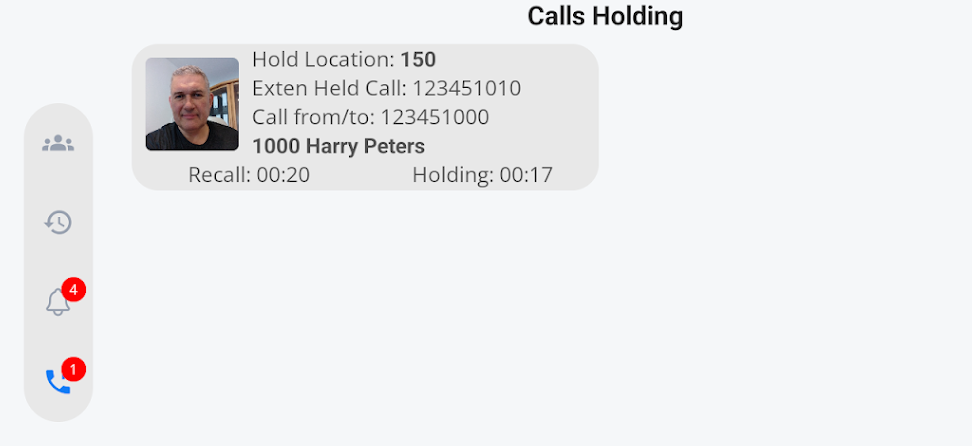
| When the Hold groups option is enabled on the portal, your handset will see an extra icon on the left-hand side of the screen. |
|
|
|
Clicking the icon will take you into the call-holding screen. |
| You can see if any calls are on hold in this group by the red circle and a number indicating the number of calls on hold. |
|
|
|
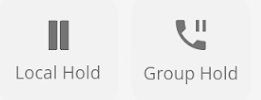
To place a call on hold, you will be presented with two options: Local Hold and Group Hold.
The local hold button will place a call on hold as usual.
The Group Hold button will place the call into the hold group to which you belong. |
|
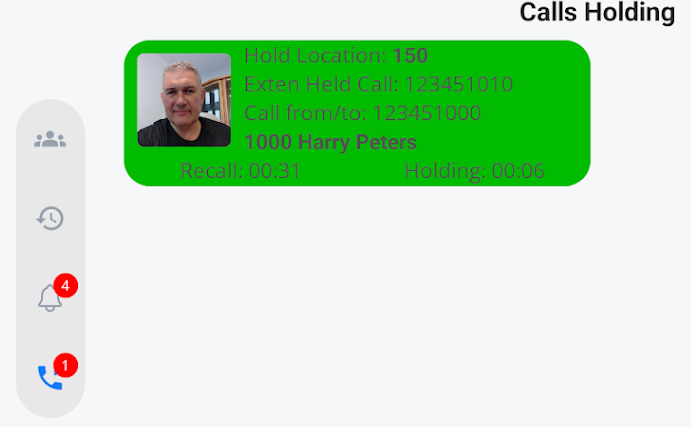
Your Held call will now be available for anyone in your group to access and take over. You can only access a call if your phone is idle and you are not attending to another call. Green means you can take control of the call.
If the call is held and greyed out, this means you cannot access the call.
|
|
|
Once the recall timer has counted down to zero seconds, the call will be returned to the person who placed it on hold in the group.
This is to stop any calls from being forgotten.
Your service provider can set up this timer. We recommend a minimum holding time of 60 seconds to a maximum holding time of 600 seconds (10 minutes) |
|



Call Holding Information
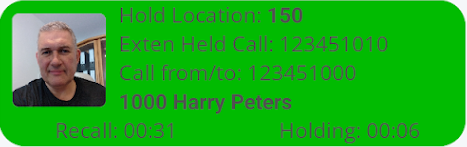
|
|
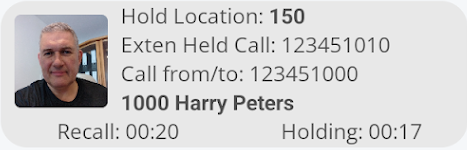
The avatar gives a good visual indication of who placed the call on hold. |
| Hold Location indicates the exact location of the call within the system. This is useful if the same person has held multiple calls and you need to take a particular call. You can announce the hold location to your colleague. |
|
|
|
Exten held call provides the caller who placed the call on hold and the extension from which the call was placed. |
| Call from/to provides the external or internal number |
|
|
|
You may also see a name if it has been populated in the cloud phone book. |
| This is the amount of time remaining before the held call is returned to the person who placed it on hold. |
|
|
|
This is the current hold time of the call. |