
Transcription For Call Recording Bundles - Automatic
Under call recording bundles, you can have the call recording transcribed.To perform this function, go to a call recording within the call recording group. Find a call recording you want to transcribe and click on the ’Transcribe’ word on the right side.
Would you like to transcribe all calls? You can enable auto-transcription under call recording options and choose how many hours youto want includedinclude in the bundle.

When you click it, you will be presented with this screen;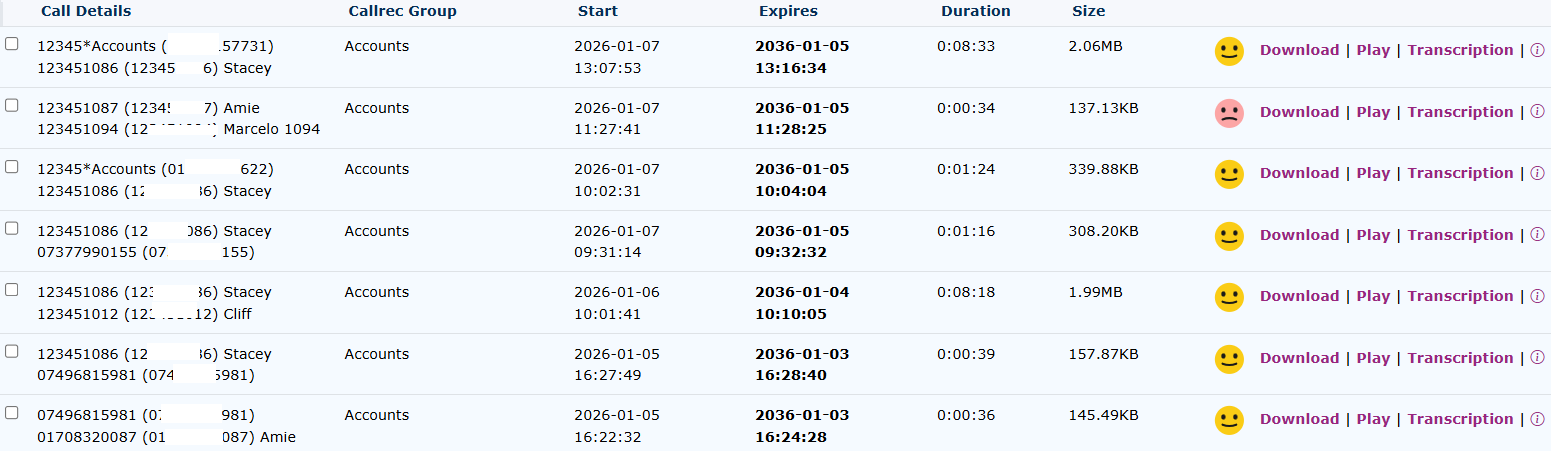
| Call Details provide information about the origin and the destination of the call. |



Expiry time is the date and time the call recording and transcription will be deleted from the servers Duration is the length of the call recording


You can transcribeuse the download button to save the call recording,to oryour youPC.


Click on the transcription button to see the individual transcription.
This info button shows the activity log of this call recording and

When you click ‘Send request,’ the cost of the transcription will be displayed. This cost will vary depending on the length of the call recording.


Once finished, your call recording will be transcribed in the box.
Display Times
There is an additional option to display the time the sentences are spoken. This is to assist in finding the place in the recording where the text was converted.

The ‘show times’ appear like this.
AI Transcription Summary
It is also possible to have the transcription summarised. This is particularly good for long call recordings. This feature applies Artificial Intelligence to give you the most important part of the call recording in a simple, short paragraph.

You can select this option simultaneously when you ask for the call recording to be transcribed. Select the Transcribe and Summarise option.

Once the summary has been compiled, it will appear at the top of the transcription.


This is a sample summary transcription from the longer transcription that was performed above.
To show the current status of any transcriptions, the following applies.
