
Getting your call transcriptions into the HaloPSA tickets
|
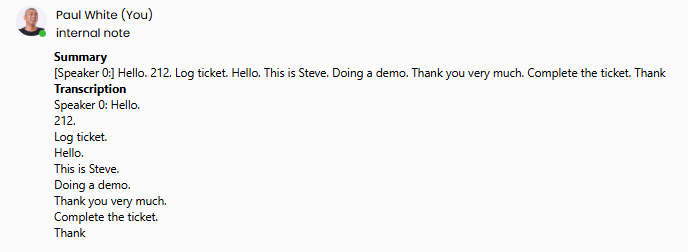
Once HaloPSA has been enabled on the system portal, you can add extra features, such as call transcription, allowing any telephone conversations to be transcribed and viewed within the Halo ticketing system. |
|
|
|
To enable this, please refer to the transcription section of the portal manual. Once this is completed, transcriptions will automatically be added to the HaloPSA portal. |

Please note the following system requirements and processes to ensure HaloPSA works correctly:
- Call Duration Threshold: For a call to automatically generate a log and summary in HaloPSA, it must last at least 15 seconds.
- Completing a Ticket: Agents must select "Log Ticket" and click "Complete" within the interface, rather than just hanging up the call, to make sure the interaction is correctly routed and finalised in HaloPSA.
- Unrecognised Numbers: If an incoming number isn't recognised, please create the matching customer profile in HaloPSA first. The call data can then be assigned within a 2-hour window.
- AI Processing Time: Once a call ends, an AI-generated summary is sent to HaloPSA in around 10 seconds, with the full transcript typically available within 30 seconds.